
Welcome mise-en-place!
Why Make and Gradle stopped orchestrating my projects, and how mise (tasks, tool versions and environment in one file) took over, even more so with AI agents.
Contents
- Make and Gradle are good at running commands, but neither looks after what surrounds them: tool versions and the environment.
- mise puts tasks, tool versions and environment variables in a single
mise.toml. Onemise installsets up a machine. - Gradle keeps building Kotlin. mise orchestrates everything around it, the same way for me, for CI and for AI agents.
For years, I started my projects the same way: a Makefile at the root. Not to compile C, but to offer a single entry point. make setup, make test, make lint, make deploy. Whatever the language or framework, anyone joining the project knew where to start.
And on my Android projects, that role went to Gradle: everything went through ./gradlew, including things that had nothing to do with compiling.
It worked well. Until the day I realized I was spending more time working around these tools than using them. Today, all my projects use mise instead. The name comes from “mise en place”, the moment when a cook sets up their whole station before service. In this article, I cover three things:
- why I used Make and Gradle, and why each one ended up getting in my way;
- why I think mise is the right answer: tasks, versions and an environment, simply;
- why it matters even more in the age of AI agents.
1. Make and Gradle: good habits, bad conductors
Why I used Make
Make had three qualities that are hard to beat:
- It is everywhere. Preinstalled on macOS and on most Linux distributions, there is nothing to install.
- Everyone knows the convention. Nobody needs to read a doc to type
make test. - It is agnostic. Node, Python, Terraform, Docker: a
Makefilecan call anything.
Where Make falls short
Let’s be honest: Make is a file-oriented build tool. Its logic is “rebuild this target if its dependencies are newer”. When you use it as a command runner, you fight that model:
.PHONYeverywhere, otherwise a file namedtestat the root silently breaksmake test.- Mandatory tabs, and the cryptic error message when your editor inserted spaces.
- One shell per line: a
cdon one line has no effect on the next, hence the cascading&& \. - Arguments: passing a parameter looks like
make deploy ENV=staging, and anything richer quickly becomes painful. - Portability: GNU Make, the old version shipped with macOS, Windows… The same
Makefiledoes not behave the same everywhere.
Why I used Gradle
If you come from the Android world, the entry point is not a Makefile, it is Gradle. And using it that way is not absurd:
- It is already there. There is no such thing as an Android project without Gradle. Adding a task to
build.gradle.ktsfelt simpler than introducing a new tool. - The wrapper pins the version.
./gradlewdownloads the right Gradle version with nothing to install by hand. That is exactly the promise I wanted for the rest of my tools. - A real task graph.
dependsOn, incremental execution, the build cache: Gradle knows how to redo only what changed, and it does it very well. - A single language. Writing your tasks in Kotlin, in the IDE, with autocompletion, is comfortable for a Kotlin team.
- CI followed naturally. One
./gradlew checkand you were done.
Where Gradle falls short
The problem shows up as soon as you ask Gradle to do anything other than compile Kotlin. Take an ordinary case on a multiplatform project: run SwiftLint, build the iOS app and group the checks.
// build.gradle.kts (root)
val swiftLint by tasks.registering(Exec::class) {
    group = "verification"
    description = "Lint the Swift code"
    workingDir = file("iosApp")
    commandLine("swiftlint", "--strict")
}

val buildIos by tasks.registering(Exec::class) {
    group = "build"
    description = "Build the iOS app for the simulator"
    workingDir = file("iosApp")
    commandLine(
        "xcodebuild",
        "-project", "iosApp.xcodeproj",
        "-scheme", "iosApp",
        "-destination", "generic/platform=iOS Simulator",
        "build",
    )
}

tasks.register("checkAll") {
    group = "verification"
    dependsOn(":shared:allTests", ":androidApp:lint", swiftLint)
}
Twenty-five lines to call two commands and group them. And verbosity is only the visible part:
- Gradle is a build tool, not a command runner. Calling a binary goes through a task type (
Exec), an API and properties to configure. You write code to describe what one line of shell would do. - Every call pays for the Gradle lifecycle. Before running anything, Gradle has to start or join the JVM daemon, then initialize and configure the build, with its modules and plugins. To run a linter that takes one second, that is an expensive detour. The configuration cache reduces the cost, but it comes with its own rules about what a task is allowed to do.
- Gradle does not manage tools outside the JVM. Nothing guarantees that
swiftlintis installed, or in which version. And even./gradlewneeds a JDK already present on the machine to start.
With Kotlin Multiplatform, these flaws become daily ones, because my project is no longer a single ecosystem:
- the shared module and the Android app, built by Gradle;
- the iOS app, in Xcode, with its own tools (
xcodebuild, SwiftLint, Swift Package Manager); - fastlane, and therefore Ruby, to publish to the stores;
- and depending on the project, a backend, a website, Python scripts or infrastructure.
Making Gradle the conductor of all this is like asking one of the musicians to conduct the whole orchestra.
What Make and Gradle have in common
Both know how to run commands. Neither really takes care of what surrounds those commands: tool versions and the environment. Make assumes everything is already installed. Gradle manages its own version and the Kotlin dependencies, but nothing beyond the JVM.
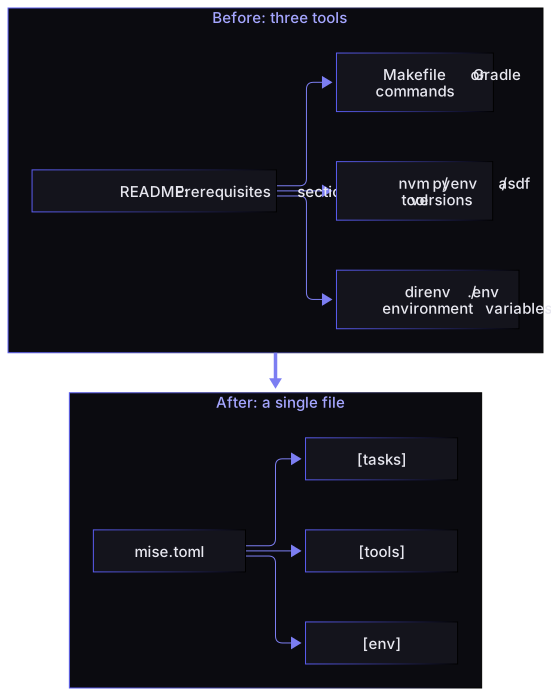
My make setup always assumed that the right version of Node, Python, Terraform or Java was already installed. The result: a README with a “Prerequisites” section nobody reads, versions drifting between teammates, and the classic “works on my machine”.
So in reality I had three tools: a version manager (nvm, pyenv, asdf…), direnv or a .env file for environment variables, and Make or Gradle for commands. Three config files, three things to install, three ways to get out of sync.
2. Why mise: tasks, versions, an environment
mise covers these three needs with a single file, mise.toml. That is what I like most about it: there is nothing more to understand.
[tools]
node = "22"
python = "3.13"
terraform = "1.9"

[env]
_.file = ".env"
APP_ENV = "development"

[tasks.install]
description = "Install dependencies"
run = "npm ci"

[tasks.lint]
run = "npm run lint"

[tasks.test]
description = "Run the tests"
depends = ["lint"]
run = "npm test"

[tasks.dev]
depends = ["install"]
run = "npm run dev"
Tasks
A task is a name, a description and a command. No .PHONY, no tabs, no DSL: just TOML.
Discoverability. Like ./gradlew tasks, mise tasks lists every task with its description. No need to open the file to know what exists.
Dependencies and parallelism. depends declares what must run first, and mise runs dependencies in parallel. To run several independent tasks at once: mise run lint ::: test.
File tasks. When a script gets long, I move it out of the TOML and into a mise-tasks/ directory: a real shell file (or Python, or anything else), with syntax highlighting and linting, that mise exposes as a task.
Caching. Declare sources and outputs on a task and mise skips it when nothing has changed. This is the one real strength of Make, and I get it back exactly where I need it.
Versions
The [tools] section pins the version of every tool in the project: Node, Python, Java, Ruby, SwiftLint, Terraform… mise install installs everything at once, and each project keeps its own versions without interfering with the others. In my terminal, the right versions activate as soon as I enter the project directory.
To go further, mise lock generates a mise.lock that records the exact versions and their checksums, which makes installs reproducible from one machine to the next. And because mise also manages the JDK, ./gradlew starts with the right Java everywhere, with no JAVA_HOME tweaking.
Environment
The [env] section replaces direnv and manual export lines: project variables, loading a .env file, adding a directory to the PATH. These variables apply in my shell as well as in tasks.
Two details I use every day:
mise.local.tomlfor my personal overrides, ignored by Git;MISE_ENV=stagingto loadmise.staging.tomlon top of the base config, without duplicating the rest.
It’s simple
Onboarding a new developer takes two lines:
mise install
mise run dev
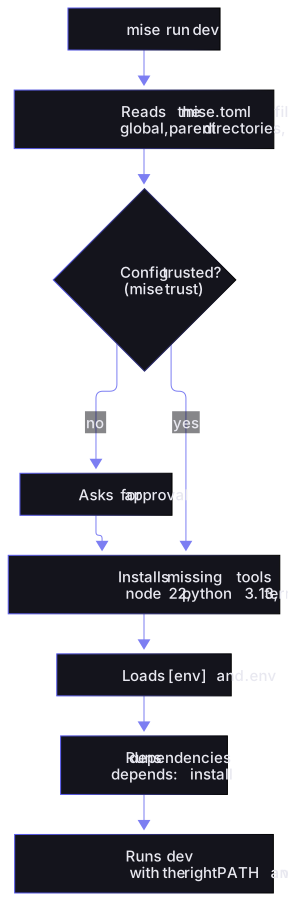
mise installs the right tool versions, loads the environment variables, then runs the task with that environment. No more “Prerequisites” section in the README.
Compared with the Makefile I used to write, the same needs come down to this:
| Makefile | mise | |
|---|---|---|
| Run a task | make test | mise run test (or mise test) |
| List tasks | by hand, or a home-made help target | mise tasks |
| Tool versions | out of scope | [tools], installed automatically |
| Env variables | export or direnv | [env], .env loaded natively |
| Task dependencies | prerequisite targets | depends |
| Parallelism | make -j, with its surprises | built in, plus mise run lint ::: test |
| Syntax | tabs, .PHONY, $$ | readable TOML or plain shell scripts |
And here is what actually happens when you run a task:
On a Kotlin Multiplatform project
The same need as the Gradle example above, with mise:
[tools]
java = "temurin-21"
ruby = "3.3"
swiftlint = "0.57"

[tasks."shared:test"]
description = "Shared module tests, all targets"
run = "./gradlew :shared:allTests"

[tasks."android:lint"]
run = "./gradlew :androidApp:lint"

[tasks."ios:lint"]
dir = "iosApp"
run = "swiftlint --strict"

[tasks."ios:build"]
dir = "iosApp"
run = """
xcodebuild -project iosApp.xcodeproj -scheme iosApp \
  -destination 'generic/platform=iOS Simulator' build
"""

[tasks."ios:beta"]
dir = "iosApp"
run = "bundle exec fastlane beta"

[tasks."gradle:check"]
description = "Shared tests and Android lint, in a single Gradle call"
run = "./gradlew :shared:allTests :androidApp:lint"

[tasks.check]
description = "All checks, Android and iOS"
depends = ["gradle:check", "ios:lint"]
What this changes day to day:
- The JDK, Ruby and SwiftLint are versioned in the same place. A new iOS developer runs
mise installlike everyone else. - iOS tasks no longer wake up the Gradle daemon.
mise run ios:lintruns SwiftLint directly. mise run checkruns Gradle and SwiftLint in parallel. On the Gradle side, a single call covers the tests and the lint: two simultaneous./gradlewruns on the same project would start two daemons fighting over the same locks.- Task names make sense to everyone.
mise tasksshowsandroid:*,ios:*andshared:*, whether you come from Kotlin or Swift.
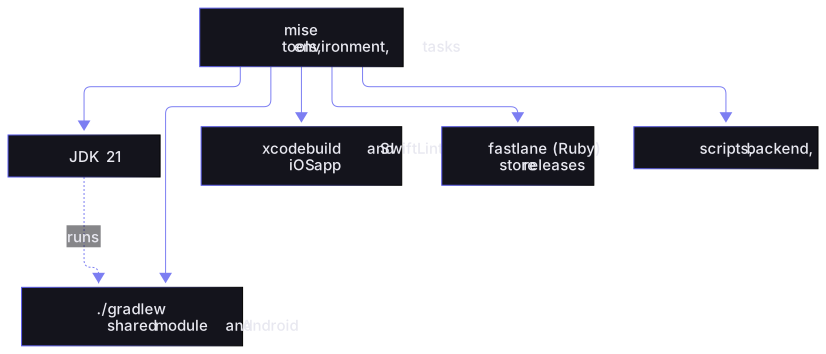
I did not replace Gradle. It compiles, tests, resolves Kotlin dependencies and caches, and it does that better than any other tool. What I took away from it is the conductor role: mise sits above, and Gradle becomes one of the tools it calls.
| Gradle as the orchestrator | mise as the orchestrator | |
|---|---|---|
| Run a non-JVM tool | an Exec task in Kotlin DSL | one run line |
| Cost of a call | JVM daemon and build configuration | runs the command directly |
| Non-JVM tool versions | not managed | [tools] |
| JDK needed to start | must already be installed | installed by mise |
| Incremental build of Kotlin code | excellent | delegated to Gradle |
The rule I now follow is simple: if it compiles Kotlin, it is Gradle. If it orchestrates, it is mise.
Monorepos and CI
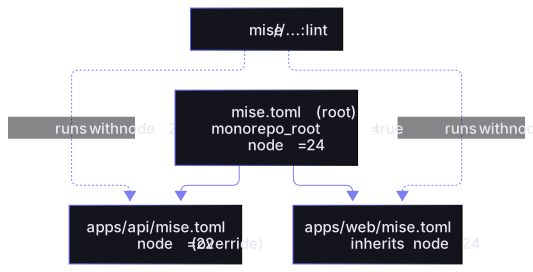
Monorepos. This is what won me over for good. With monorepo_root = true and the list of sub-projects at the root, each sub-project keeps its own mise.toml:
# mise.toml (root)
monorepo_root = true

[monorepo]
config_roots = ["apps/api", "apps/web"]

[tools]
node = "24"
I can then run any task from anywhere:
mise //apps/api:test       # the API tests
mise //...:lint            # lint every project
Each task runs with the tools and environment of its own project. The API can stay on Node 22 while the frontend moves to Node 24, with no gymnastics.
CI aligned with local. In CI, I use the jdx/mise-action GitHub Action, then the same mise run commands as on my machine. CI no longer reinvents its own way of installing tools.
3. Why it matters even more in the age of AI
Today, part of my code is written, tested and fixed by agents like Claude Code or Codex. An agent is a new developer who joins the project several times a day, with no memory of the day before. Everything that helps a human get started helps an agent even more.
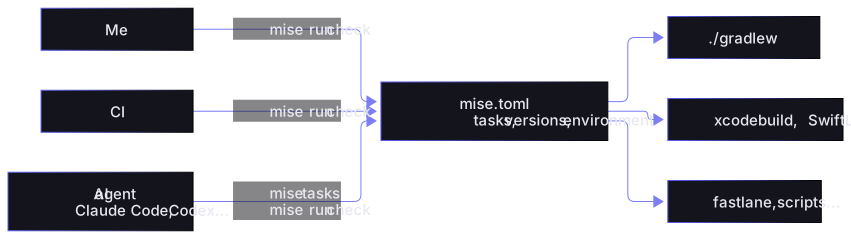
One contract for three consumers: me, CI and the agent.
An entry point an agent discovers on its own
Without a convention, an agent guesses: ./gradlew or npm? xcodebuild with which parameters? From which directory? It fumbles, gets it wrong, tries again. With mise, mise tasks gives it the list of possible actions with their descriptions, and the mise.toml reads in a few seconds.
As a result, the “commands” part of my AGENTS.md (or CLAUDE.md) fits in a few lines:
## Commands

- Install the environment: `mise install`
- List available tasks: `mise tasks`
- Before proposing a change: `mise run check`
- Do not run `./gradlew` or `xcodebuild` directly: go through the mise tasks.
Less code to read, fewer mistakes
When I ask an agent to add a check, there are two worlds. On the Gradle side: an Exec task, a dependsOn, compatibility with the configuration cache, and a full build to rerun to make sure nothing is broken. On the mise side: one line of TOML. Less context to load, fewer tokens, fewer chances to break the build. And reviewing a three-line TOML diff takes me ten seconds.
The same environment for the agent as for me
Agents work in non-interactive shells, often in Git worktrees, sometimes in cloud sandboxes. Without version management, each of these environments is one more chance to hit the wrong JDK or a missing SwiftLint. With mise, mise install gives the agent exactly the same versions as me and as CI.
One subtlety to know about: a non-interactive shell does not run mise activate. For Claude Code, the mise docs suggest a hook that loads the project environment before each command:
{
  "hooks": {
    "SessionStart": [
      {
        "hooks": [
          {
            "type": "command",
            "command": "[ -n \"$CLAUDE_ENV_FILE\" ] && echo 'eval \"$(mise hook-env -s bash)\"' >> \"$CLAUDE_ENV_FILE\"; true"
          }
        ]
      }
    ]
  }
}
If your agent runs its commands in zsh, replace -s bash with -s zsh. The alternative, prefixing every command with mise x --, also works, but it weighs down every call and agents end up forgetting it.
A bonus for worktrees: tools are installed in the mise data directory, not in the project, so a new worktree reinstalls nothing.
A fast feedback loop
An agent runs the checks dozens of times per session. Every second of startup is multiplied accordingly. Tasks that do not need Gradle (SwiftLint, formatting, scripts) start immediately, and the sources / outputs cache skips whatever has not changed. The agent iterates faster, and I wait less.
Guardrails
Tasks define a vocabulary: the agent runs check or ios:lint, not improvised commands. I can allow mise run without approval in the agent’s permissions and keep everything else under control, as long as I review the changes it makes to mise.toml.
mise goes further with mise mcp, an MCP server that lets an assistant read the project’s tools, tasks, environment and config, and run its tasks:
claude mcp add mise -- mise --cd /path/to/project mcpThe run tool takes a task name, not an arbitrary script, and it refuses to run on a project whose config has not been approved with mise trust. To let an assistant explore a project without executing anything, MISE_SAFE=1 turns off execution while keeping read access to tools, tasks and config.
Caveats
Not everything is free, and I would rather be upfront about it:
- It is one more tool to install. Make is everywhere, mise is not. In practice, it is the only thing you install by hand, since it installs everything else.
mise trust. Amise.tomlcan execute code (hooks, computed variables…). So mise asks you to approve a repository’s config before applying it. That is a good thing for security, but it is surprising the first time.- Team adoption. Everyone knows
makeand./gradlew. It takes a few days formise runto become a reflex. - Agents need a small setup step. Without the hook or
mise x --, their non-interactive shell does not see the project’s tools. - Make and Gradle remain relevant for what they were designed for: real file-based builds for Make, Kotlin and Android compilation for Gradle. My criticism only targets their use as conductors.
Wrapping up
Make and Gradle served as my entry point for a long time, but they only did a third of the job: running commands. Tool versions and the environment had to be handled elsewhere, and Gradle added its verbosity and startup cost as soon as you stepped outside the JVM.
mise brings the three together in a single file: tasks, versions, an environment. One command to get started, the same thing locally and in CI. And on my Kotlin Multiplatform projects, Gradle has not disappeared: it simply stopped orchestrating everything to focus on what it does best, building Kotlin.
Now that part of the work is done by agents, this simple and readable contract is worth even more: what is clear to a human is clear to an AI too.
If you have a Makefile that contains nothing but .PHONY targets, or a build.gradle.kts full of Exec tasks, try converting them on a small project. Chances are you will not go back.